

Dashboards
Showing live data
How a widget takes a value from the game: pick one of 263 fields, set the range a gauge reads it against, and choose how a readout turns it into text.
Every value a dashboard shows comes from SimHub: the Pitrig plugin reads the game and sends the board the fields its widgets name. Which games send which fields is in Game marks; colours that change with a value are in Conditions and colours.
Choose a field
- 1In the widget’s Data group, click into Binding. On a text widget it sits inside Source 1.
- 2Type part of a field name or of a category, such as
fuelortyres.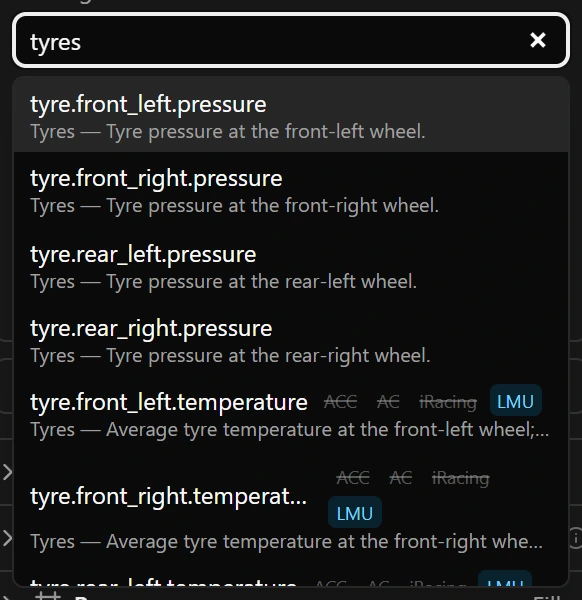
Leaving the box while what you typed matches no field puts the previous field back. Once one is chosen, the line under it sums it up, for example Engine · float32 · percent · fast · ID 08:
| Part | What it says |
|---|---|
| Type | float32 a number with decimals, uint32 a whole number from 0 up, int32 a whole number that can be negative, boolean true or false (sent as 1 or 0), text text that SimHub formats, such as a gear N. |
| Unit | source means the value arrives already formatted. |
| Rate | How often the plugin sends it: fast, normal, slow or changes (paces). |
| ID | The short code that travels to the board in place of the name. |
Game marks
Fields that differ from game to game carry four marks: ACC, AC, iRacing and LMU. A highlighted mark means that game sends the field; a struck-through mark means it does not, and a widget on that field keeps its zero or its Fallback there. A field without marks is sent for any game SimHub reports it for.
The full list on the Protocol page
Protocol in the left column lists every field with the value arriving now. Its search also looks in the description, the SimHub property and the games.
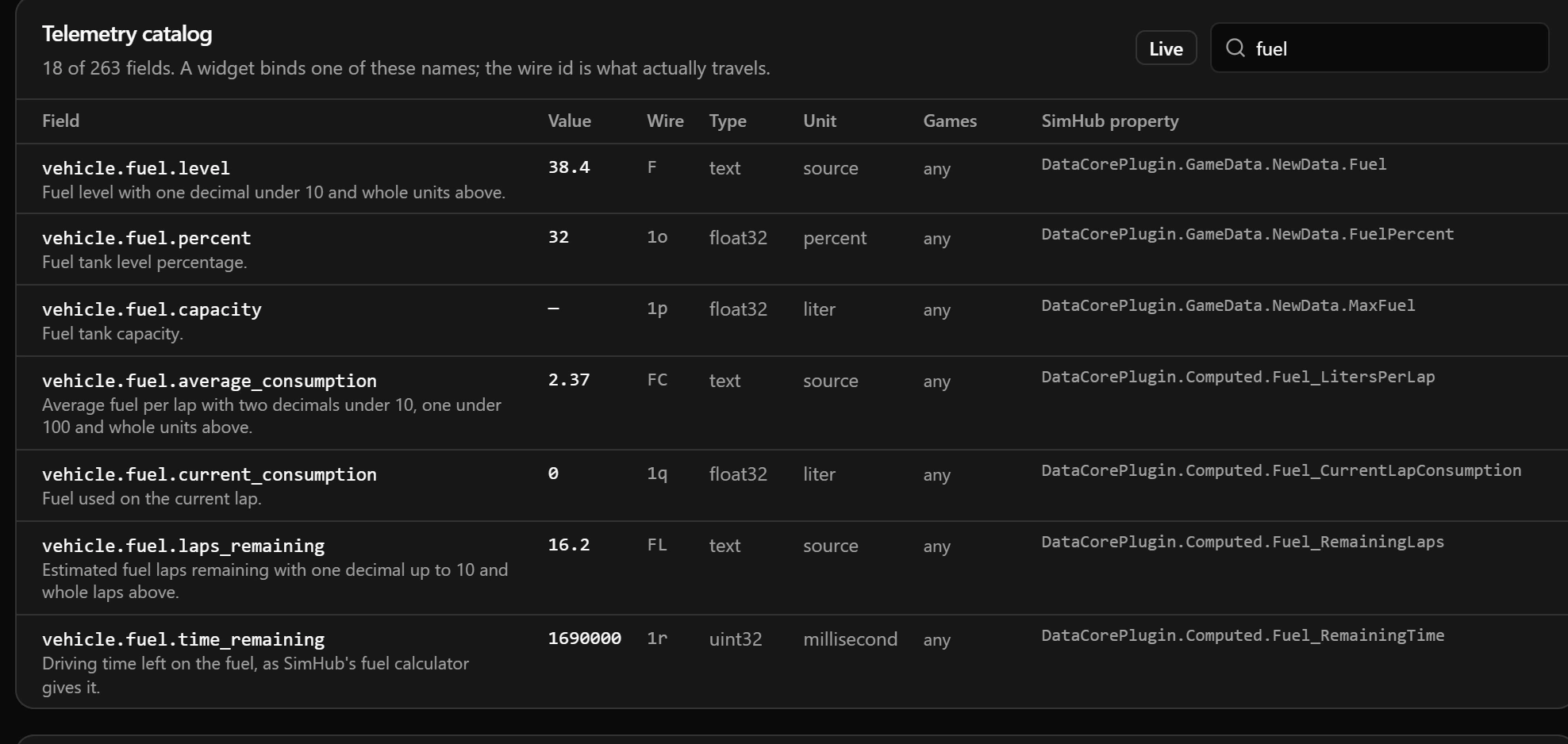
- 1Wire: the ID.
- 2SimHub property: — where the plugin works the value out itself.
While the table is open, the configurator asks the plugin for every field, so the Value column fills in whenever SimHub has data. Elsewhere it asks only for the fields your dashboard and LEDs use.
Range: where a gauge starts and ends
A bar, an arc, a Lights widget and every graph trace read their field against a Range: a value outside it reads as empty or full. The maximum must be above the minimum, or the configurator cannot save.
| Widget | Field | Range |
|---|---|---|
| Shift lamps over the top of the revs | engine.rpm_percent | 82 to 99 |
| Rev needle | engine.rpm | 0 to 9000 |
| Centred delta bar, one second either way | session.lap.delta with From origin at 0 | −1000 to 1000 |
A text field such as engine.rpm works on a gauge as long as it holds a plain number.
The lap timer
Modifier has one choice besides none: lap_timer. It keeps the current lap time running on the board’s own clock between the updates SimHub sends, so the time on screen runs smoothly instead of stepping with each update. It eases towards each update, jumps when it is more than a quarter of a second out or a new lap starts, and stops counting a second after the last update. Choosing it switches the field to session.lap.current_time, the only one it works with; show it with the duration_ms transform below. One source in the whole dashboard may use it: a second keeps the configurator from saving.
Turning a value into text
| Transform | Shows | Offered for |
|---|---|---|
source_text (default) | The value exactly as the plugin wrote it: a gear N, a fuel estimate 4.2, a temperature 87.531, a lap time in plain milliseconds. | Every field |
number | Value × Scale + Offset, rounded to Decimals. | Every field except true-or-false ones; a text field only while it holds a plain number |
duration_ms | MM:SS.mmm, such as 01:42.315. | Times in whole milliseconds that cannot be negative: laps, sectors |
clock_ms | HH:MM:SS, such as 00:42:10. | The same fields: session time, time left, fuel time left |
signed_duration_ms | +S.mmm or -S.mmm, such as -0.245. | Milliseconds that can be negative: deltas |
Units picks the scale and offset of a common conversion, and for pressures the decimals too, and switches the transform to number; the board always receives the field in its own unit. vehicle.speed is sent in km/h, and a tyre pressure switches to psi as soon as you choose it.
Units does not add a unit label by itself: type psi into Suffix, and picking bar later swaps it for bar.
Several values in one text
- 1Draw a Text widget. In Source 1, choose
session.positionand typePand a space into Prefix. - 2Press Add source, choose
session.participantsand type/into its Prefix. - 3The widget reads
P 3/24. As one widget, the/does not move when the position grows from one digit to two.
When there is no value
| Situation | Text widget | Bar, arc, Lights, graph |
|---|---|---|
| No data has reached the board yet, such as before SimHub starts | Its zero in its own format: 0, 0.0, 00:00.000, +0.000, with prefix and suffix | Rests at 0, held inside the range: empty, or at the start of a range that begins above 0 |
| Data arrives, but none of the widget’s fields has a value: no game is running, or the game does not send them | Fallback if you set one, otherwise the zero | The same as above |
| Some sources of a text widget have a value, others not | Live values, and the zero for the silent sources | — |
The canvas shows the same as the board: live values while the plugin sends data, the zero otherwise.
Smoother movement
Values arrive at most 60 times a second, many only 20 or 5 times. Smoothing, in the dashboard settings, decides whether bars, arcs, needles, graph traces and text with the number transform glide between updates. off, the default, draws each update as it lands, so a slow feed moves in steps. interpolate glides to each one so as to arrive when the next is due, one update behind: 16 ms for a field sent 60 times a second, 50 ms for one sent 20 times. predict keeps moving at the measured rate and corrects at the next update: no lag on average, a small overshoot when the value turns. A pause longer than 250 ms is drawn as a jump, so values that change on events, such as the lap count, never glide. Conditions, colour ramps, captions and Lights always use the latest value as it arrives, and smoothing leaves a source with the lap timer alone.
Good to know
- Without a transform, a time field shows plain milliseconds and a true-or-false field shows
1or0. - A conversion with an offset shows its converted zero while there is no value: °F reads
32. - In Prefix, Suffix and Fallback a plain letter takes one byte, an icon three.
- Emptying Binding and leaving the box leaves the widget without a field, and the configurator cannot save until you choose one.
Limits
| What | Limit |
|---|---|
| Fields in the catalogue | 263 |
| Sources in one text widget | 3 |
| Traces in one graph, its own included | 3 |
| Decimals | 0 to 4 |
| Prefix, Suffix, Fallback | 15 bytes each |
| Sources using the lap timer, whole dashboard | 1 |